
Expeditions handbook
Controls for gathering, building and pausing
Use left-click to mark dig priorities and right-click to remove them. Space pauses or resumes the game; WASD or the arrow keys move the view. Tunnel mode changes the base-building tool, and clicking a building opens its panel and leaves that mode.
Keyboard and mouse controls. Basic keybindings can be changed in the options added in 0.80; a rebound key takes precedence over a default.
Updated 2026-10-31 · Demo
Steps
Know the default controls
Start with the small set that changes your plan. Dig marks are priorities for autonomous dwarves, not direct movement orders.
Verified keyboard and mouse controls Action Default / behavior Mark a priority area Left mouse button Remove an area from the plan Right mouse button Pause / resume Space Move the camera WASD or arrow keys Inspect an upgrade Point at the node to read its information Open a building in Tunnel mode Click the building; its panel opens and Tunnel mode exits Pause before changing a busy plan
Press Space to pause while you review the hall or a dig plan, then press it again to continue. Do not confuse pausing the game with the whole-building or recipe controls inside a production panel.
Move the camera to check the whole route
Use WASD or arrows to inspect the path between rooms and the currently reachable work area. The Demo's 0.65 update increased the maximum zoom-out distance, and 0.80 improved the cursor when zoomed out. Check a close view again when selecting a small workshop.
Leave Tunnel mode before diagnosing a recipe
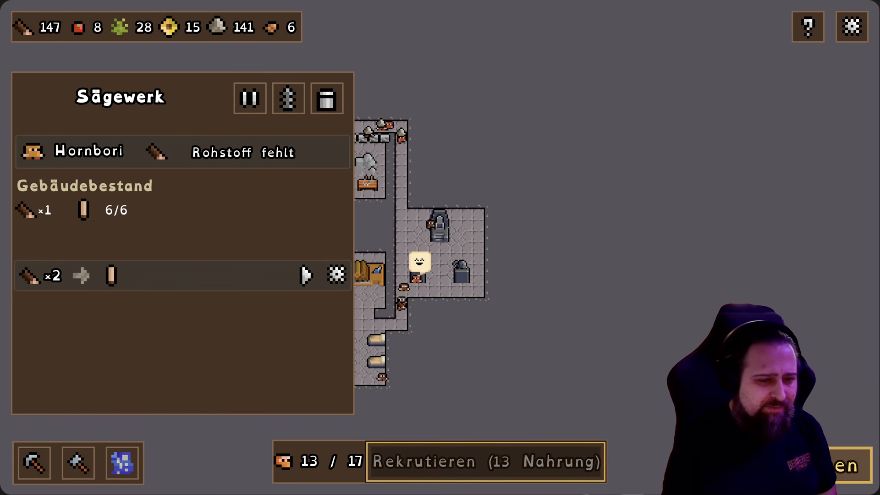
In the base, use the Tunnel tool to carve access. Clicking a workshop exits that mode and opens the building. The Sawmill example shows separate controls for a whole building and an individual recipe; those do not replace Space's game pause.
 Open full-size image ↗
German Sawmill panel, EironMaidenTV's 28 Oct Demo recording: recipe gear at the row's right, building pause at the top. Check changed bindings when a default does nothing
Review your basic keybinding options if the defaults do not respond. For a production problem, also look at the affected building's own paused state: a game that is running can still contain a paused workshop or recipe.
What should change
You can pause and resume, move the view, add and clear a priority mark, and open a workshop without staying in Tunnel mode.
If it still does not work
If a dwarf does not immediately follow one mark, remember it is an autonomous priority system. Inspect access and available work rather than repeatedly clicking the same tile. If the keyboard does nothing, check your rebound controls and whether another input field has focus.
Next check
Sources & scope
Mouse priorities come from the official How to play. Space/arrows, Tunnel-mode exit and camera changes are documented in 0.65; basic rebinds in 0.80. The German Sawmill illustration is a 28 October Demo example, not a universal keyboard layout.