
Production handbook
Build a workshop and connect the tunnel
Unlock the workshop in the upgrade tree, select it for building and place it on a valid area. Then use the Tunnel tool to connect it to the hall's carved passages so dwarves can reach it. An accessible building can still need inputs or have production paused.
For a workshop whose building upgrade is already available. Read that building's actual cost; no fixed all-building cost is assumed.
Updated 2026-10-31 · Demo
Steps
Unlock the building before trying to place it
Check the building branch in the upgrade tree and buy the relevant upgrade when its requirement is met. Some later building or recipe upgrades need blueprints from mines; an unavailable node is a different problem from a disconnected room.
Select the workshop and place its footprint
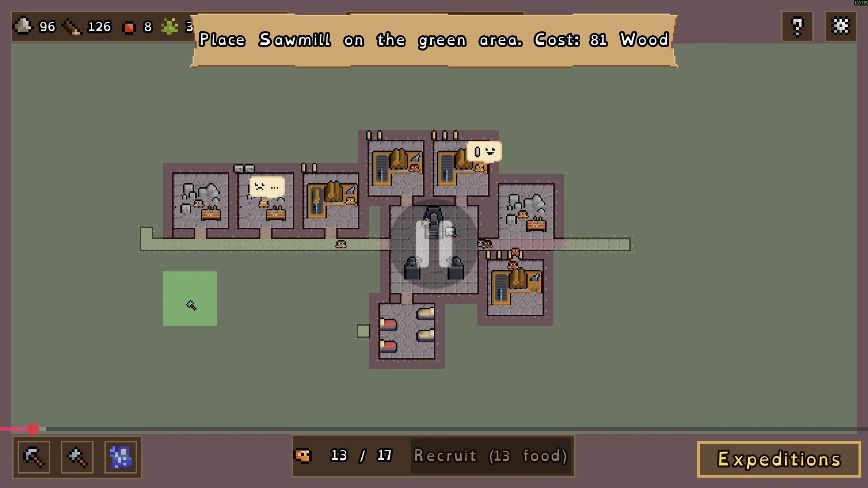
Open the build selection and choose the workshop you unlocked. Use the valid placement area shown by the game. In the dated example, a selected Sawmill must be placed in a green area; its price belongs to that particular selection.
 Open full-size image ↗
A Sawmill footprint over a green placement area in the 13 Oct Demo recording. Read your own building's displayed cost. Carve a continuous route with Tunnel
Use the Tunnel tool to dig from the existing hall passages toward the new workshop. Check the whole path rather than only the room around the building. The introductory building tutorial explains that dwarves reach buildings through carved tunnels.
Open the building and inspect its worker state
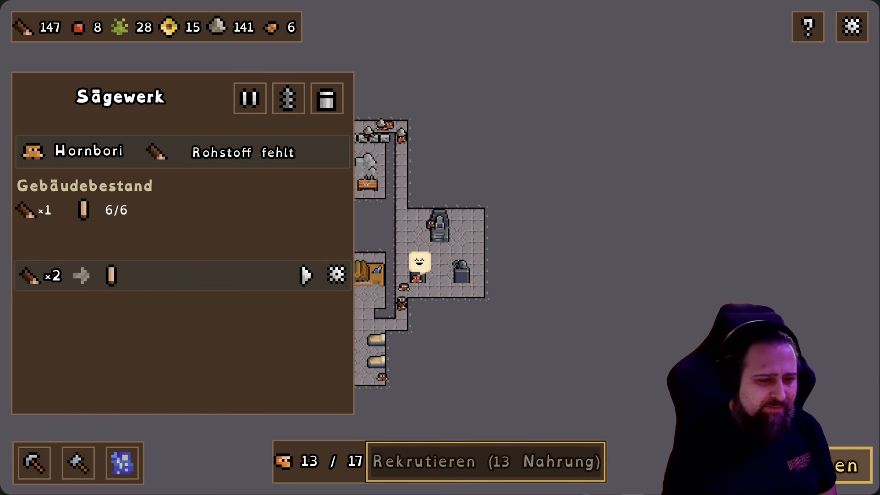
Click the placed workshop. In the Demo, that opens its panel and exits Tunnel mode. If it is not connected, revisit the route; if it is reachable but not producing, inspect its inputs, its paused state and its target stockpile instead.
 Open full-size image ↗
German Sawmill panel, EironMaidenTV's 28 Oct Demo recording: recipe gear at the row's right, building pause at the top. Check output before placing another workshop
Let the connected production chain run and watch whether output changes. If planks disappear immediately, check downstream Woodworker demand. If the target item is already full, Demo 0.90 may pause the corresponding production even though the tunnel is correct.
What should change
A carved route reaches the placed workshop, you can open its panel, and you have checked its worker and production state. Access alone is not treated as proof that every recipe is supplied.
If it still does not work
A building that is unlocked but unbuilt needs placement; a placed building without a carved route needs access; a connected idle building needs recipe checks. For a misplaced building, 0.80 returns resources on demolition and 0.90 shows an exact refund preview—read that preview before deciding to remove it.
Next check
Sources & scope
Placement and access are shown in the 13 October English Demo tutorial.0.65 documents building-click exit from Tunnel mode and blueprint-gated upgrades.0.80/0.90 document demolition returns/preview; the sample price is not a general construction cost.