
Production handbook
Storage full? Check why production paused
In Demo 0.90, a full target-item stockpile automatically pauses the corresponding production. Open the affected building, check the specific recipe and compare its input supply with its output stock. If the output is full, make room or consider the Woodworker's crate capacity option, then recheck production.
For an existing Demo production chain. This page diagnoses the pause and explains recovery directions; it does not provide the full crate crafting recipe.
Updated 2026-10-30 · Demo 0.90
Steps
Inspect the affected recipe, not only the hall total
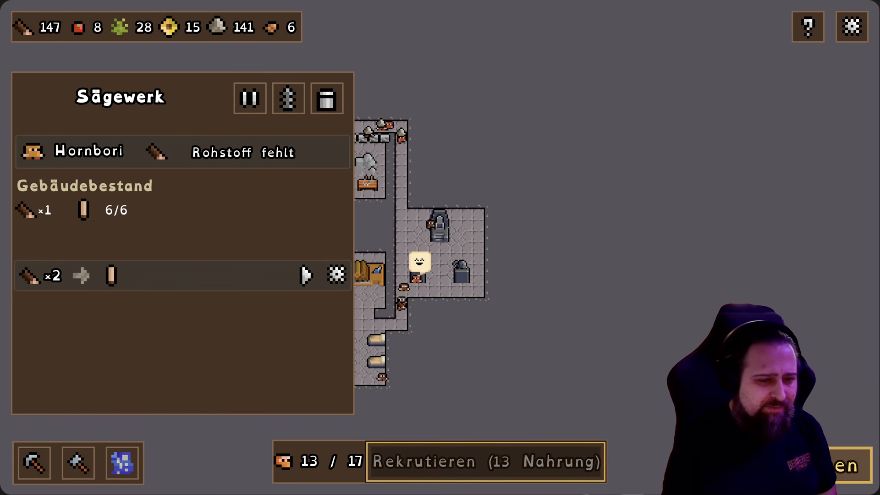
Click the affected building and look at its recipe, paused state and available input. The German Sawmill example below says Rohstoff fehlt, meaning missing raw material: that is an input problem, not a picture of a full-stockpile pause.
 Open full-size image ↗
German Sawmill, 28 Oct Demo recording: Rohstoff fehlt means missing raw material. The gear is at the recipe row's right; building pause is at the top. Check whether that recipe's target item is full
Compare the stock of the item the recipe is trying to produce with the inputs it needs. Smart Stockpiles in Demo 0.90 pauses the corresponding production when that target item's stockpile is full.
Two states that need different checks State What to check next The recipe lacks an input Check that input's supply and the production chain feeding it. The target item's stockpile is full Make room for that item or consider more storage capacity. Make room for the target item
Use existing stock where you need it so there is room for more of that item. Recheck the target item's stock before changing the production setup; adding another mill does not address a full finished-item stockpile.
Use the Demo's storage option when capacity is the problem
The developer confirms that crates made at the Woodworker increase the storage limit. The other capacity building is not included in the Demo. Check the Woodworker's crate option if you need expansion, rather than searching the Demo for that unavailable building.
 Open full-size image ↗
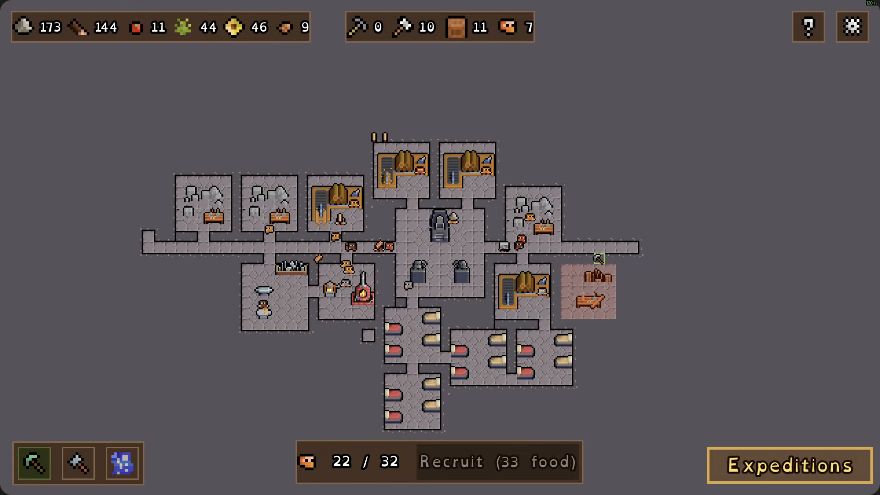
Woodworker placement in GottaBlast's 13 Oct 2026 Demo recording: log pile above the workbench. Recheck space and actual output movement
After using stock or increasing capacity, check whether there is space for the target item and whether its output changes. If production remains still, inspect the recipe's paused state and input supply again.
What should change
Confirm that there is room for the target item and that its output actually moves again. A larger capacity number by itself does not show that the affected recipe has resumed.
If it still does not work
If there is room but no output change, recheck the specific building and recipe for a pause, missing inputs or a production amount that does not match what you need. If the missing input is planks, follow the Woodworker-demand checks. After freeing space or expanding storage, check the result rather than relying on an assumed automatic-resume time.
Next check
Sources & scope
Rules: Demo 0.90. The 13 October Woodworker view predates 0.90. The production-panel example shows a German Sawmill in the 28 October Demo recording.