
Production handbook
Control torch production at the Woodworker
Click your Woodworker and find its torch recipe. Open that recipe's gear to review how many should be crafted, then adjust the quantity for your current needs. In Demo 0.90, the same recipe limit is shared across buildings, so another Woodworker is not a separate quota.
For Demo players who already have a Woodworker. This is a production-control check, not a full torch recipe or an unlock walkthrough.
Updated 2026-10-30 · Demo 0.90
Steps
Open your Woodworker and find the torch recipe
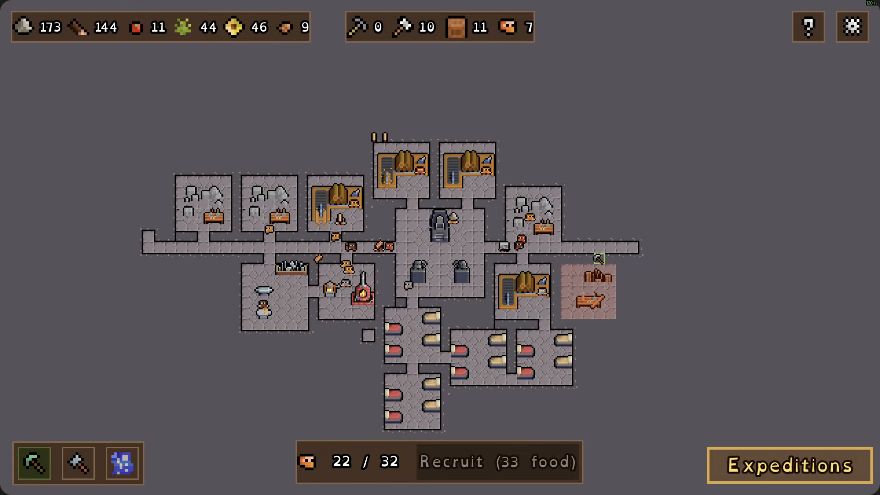
Torches are made at the Woodworker. Click the building and look through its production recipes. The log pile above the workbench is the building's recognition cue in the dated Demo view below.
 Open full-size image ↗
Woodworker placement in GottaBlast's 13 Oct 2026 Demo recording: log pile above the workbench. Open the gear for the torch recipe
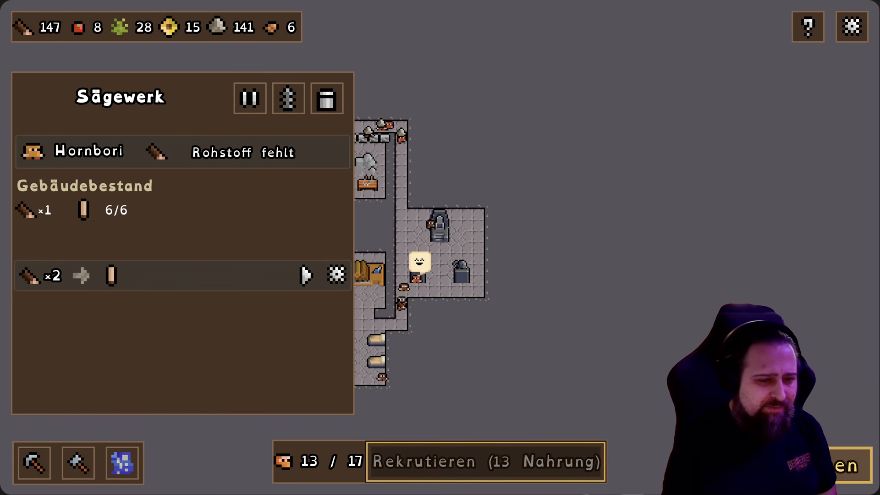
Use the gear for the specific recipe you want to control. The Sawmill example below shows a gear at the right end of a production row and a separate whole-building pause control at the top; choose the torch recipe in your Woodworker.
 Open full-size image ↗
German Sawmill panel, EironMaidenTV's 28 Oct Demo recording: recipe gear at the row's right, building pause at the top. Adjust the amount for your current needs
Review how many torches should be crafted and change that amount to fit what you plan to use. Leave enough plank supply for your other work. Demo 0.90 synchronizes limits for the same recipe across every building making that item; do not add a separate allowance for each Woodworker.
Recheck torch stock and plank demand
Confirm that the recipe has the amount you intended. Let the production chain run, then check torch stock and whether planks remain available. If planks keep disappearing, use the missing-plank checks before expanding the mills.
What should change
The torch recipe is set to the amount you intended, and you have checked both torch stock and the planks left for other work.
If it still does not work
If torches are not being produced, check whether the building or recipe is paused, whether its inputs are available, and whether the target torch stockpile is already full. In Demo 0.90, a full target stockpile pauses the corresponding production.
Next check
Sources & scope
Rules: Demo 0.90. The 13 October Woodworker view predates 0.90. The production-panel example shows a German Sawmill in the 28 October Demo recording.